Cameras & AV
Security Camera and Audio/Video Installation
Security cameras, home theater, whole-home and outdoor audio, paging, and TV or projector mounting.
Discuss Your ProjectWho it is for
Homes, commercial buildings, and industrial sites that need cameras, audio, paging, or a mounted screen.
Overview
Camera systems run on Cat5e or Cat6 and include mounting, recording, and remote viewing. A home theater adds the screen, surround sound, acoustic treatment, calibration, and a way to start the movie from one control. Whole-home and outdoor audio use the same approach in the rest of the house and on the patio.
What to Expect
01
Plan the Coverage
Doors, the floor, the lot, the dining room, or the seating area. We mark what each camera or speaker needs to cover.
02
Install
Cat5e or Cat6 to each camera, and speaker wire for the audio.
03
Test
A live camera view, a page in the correct zone, and a picture checked from the seat.
04
Document
Camera names, zones, and viewing access recorded for the people who will use the system.
Camera Systems
We install cameras, configure recording, and set up remote viewing on your devices. A cable-only prewire is still a separate visit when the walls are open and the cameras are not ready.
Camera Systems
Network cameras on Cat5e or Cat6, aimed at the door, the floor, or the lot, powered from the switch, and recording to a system in the closet.
Remote Viewing
The same system opens on a phone, a tablet, or a computer, for the people you name. We confirm a live view before we leave.
Audio & Video
Sound and picture for a room, a dining room, or a plant floor. The cable is labeled, and the system is played at the volume you will actually use.
Speaker Wiring
Speaker runs back to the amplifier or the receiver, labeled at both ends, and tested with a real signal.
Paging
Horns and zones for a shop, a warehouse, a plant, or a restaurant, so a page reaches the floor it is meant for.
Background Music
A music feed for the dining room, the showroom, or the lobby, with its own volume, separate from the page.
Whole-Home Audio
Music in more than one room, with a volume for each room and a single place to choose the source.
Outdoor Speakers
Speakers for a patio, yard, or pool area, wired back to the same audio system as the house.
Outdoor TVs
A television built for weather, mounted where it will be watched, with the input cable landed and the picture checked.
Home Theater
The room is planned from the seats: screen, sound, lighting scenes, and a way to start the movie without a pile of remotes.
Theater Design
Seating, screen size, speaker locations, and where the equipment will live, decided before the cable is pulled.
Projectors and Screens
The projector and the screen sized for the room, mounted, aligned, and checked from every seat.
Surround Sound
Speakers placed for the room, including overhead speakers when the format calls for them, then wired to the receiver or processor.
AV Electronics
The receiver, amplifier, or processor that runs the picture and the sound, programmed for the sources you actually use.
Movie Players
A movie server or player, such as Kaleidescape, set up so the library opens from the same control as the lights.
Acoustic Treatment
Panels, bass traps, and diffusers placed for the room so the sound stays clear.
Calibration
Picture and sound adjusted for the finished room, then checked from the seats.
Seating
Theater seating placed for the screen and the speakers, with power and cable for any seats that need it.
TV and Projector Mounting
The television or projector mounted, the input cable landed, and the picture checked from where people sit.
What you receive
Cameras aimed and recording
Remote viewing for the people you name
A mounted screen with a working input
Completed projects
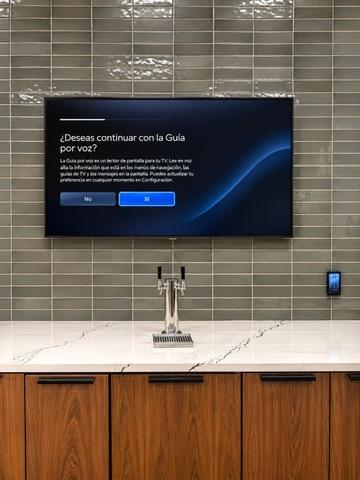
Multifamily high-rise, bar television
Multifamily high-rise television.
One view of a project with more than 40 TVs on HDMI over LAN.
The televisions run on HDMI over LAN.
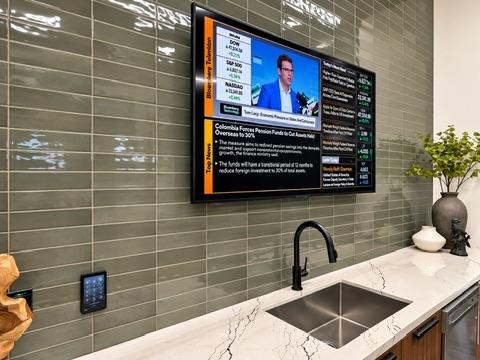
Multifamily high-rise, volume control
Multifamily high-rise volume control.
A second view of the same project, with an external volume keypad and WattBox power control.
The television has an external volume keypad and WattBox power control.
Frequently Asked Questions
How is camera prewiring different from a camera system?
Camera Prewiring installs, terminates, labels, and tests Cat5e or Cat6 at the planned locations. A camera system mounts the cameras, records them, and sets up remote viewing.
Can paging and background music have separate volume controls?
Yes. Paging can be set for a warehouse or kitchen, and background music can stay at its own level in a dining room.
What is included in a home theater?
Design, projector and screen or a mounted TV, surround speakers, the electronics, acoustic treatment, calibration, and seating when that is part of the job. Lighting and shades for the room are on the Smart Home page.
Estimates and scheduling
Send your town, the service you need, and a short description of the work. We review the request and contact you to discuss scope and scheduling before any work is booked. You can use the form or email m@kableiq.com.
Tell Us About Your Project
Share your location, the service you need, and a brief description of your project or issue. We’ll review your request and contact you to discuss the next steps.