Networks & Wi-Fi
Network and Wi-Fi Installation for Homes and Businesses
Wi-Fi coverage, access points, routers, switches, VLANs, firewalls, and VPN for homes and businesses.
Discuss Your ProjectWho it is for
Homes and businesses that need reliable Wi-Fi, separate networks for staff and guests, and remote access.
Overview
We survey the rooms that need coverage and place mesh nodes or wired access points to match. Offices get separate networks for staff, guests, and equipment, a firewall on the internet connection, and VPN access for people working away from the building.
What to Expect
01
Survey the Space
Office, conference table, shop floor, or the far rooms in a house. We record where coverage is weak.
02
Place the Equipment
Mesh for many houses. Wired access points help devices stay connected as people move between rooms.
03
Separate the Traffic
Guest Wi-Fi stays off the file server. VLANs keep equipment off the staff network.
04
Check It in the Room
A speed check at the desk or table where people actually work.
Home & Business Wi-Fi
Wi-Fi Assessments
A walk of the floor with the rooms that matter marked: the office, the conference table, the bedroom over the garage.
Coverage Troubleshooting
We find the wall, the microwave, or the single router in the basement that is leaving the far rooms offline.
Mesh Setup
A mesh system for a home where one router cannot see the whole floor plan. Nodes go where the walk showed a drop.
Access-Point Configuration
Ceiling or wall access points on Ethernet, powered from the network switch, named and set to the same network so phones roam.
Guest Networks
A separate name and password for visitors. Guest traffic stays off the computers and the file server.
Performance Optimization
Channel, band, and placement changes checked with a speed test in the rooms you use, not just next to the router.
Business Networks
Router and Switch Setup
The gateway and the switches labeled, with ports matched to the patch panel so a desk can be traced in a minute.
VLAN Configuration
Staff, guest, and equipment networks separated, so a thermostat or a visitor cannot browse the file server.
Firewall Configuration
The network firewall on the internet connection: rules for the office, and remote access only for the people who need it.
VPN Setup
A VPN so laptops on the road reach the office server without opening the whole network to the internet.
Internet Troubleshooting
We separate a provider outage from a bad router, a full switch, or a single bad cable, and we stay on the line with the ISP when it is their circuit.
Network Upgrades
Replace the consumer router, add a switch, or move a growing office onto access points, using the cable that is already in the walls when it tests clean.
What you receive
Coverage in the rooms you named
A guest network
VPN for remote staff when you need it
Completed projects
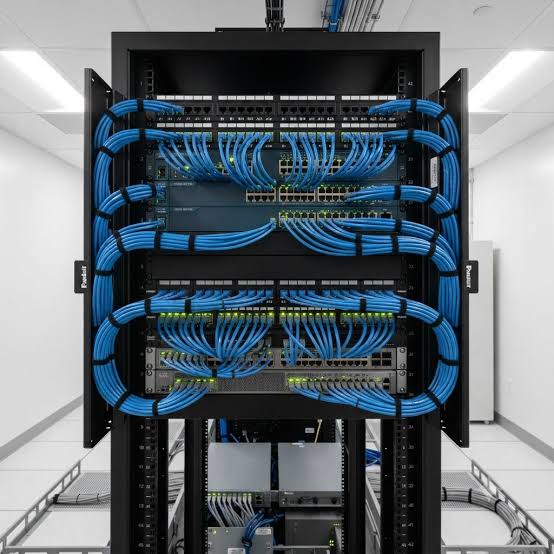
Network Cabinet Installation
Network cabinet installation.
Cables run, terminated, labeled, and commissioned.
The cabinet was commissioned with labeled connections.
Frequently Asked Questions
Is mesh the same as access points?
Mesh nodes talk to each other and fit many houses. Access points on Ethernet fit offices and larger homes where a cable can reach the ceiling.
What does firewall configuration include?
The network firewall on your internet connection, including rules for the office and remote access for the people who need it.
Estimates and scheduling
Send your town, the service you need, and a short description of the work. We review the request and contact you to discuss scope and scheduling before any work is booked. You can use the form or email m@kableiq.com.
Tell Us About Your Project
Share your location, the service you need, and a brief description of your project or issue. We’ll review your request and contact you to discuss the next steps.